Most people in 2026 are fine with 16GB for everyday use and 32GB for gaming, but RAM prices have changed the math. This guide breaks down how much memory you really need, what to buy, and when more RAM is just wasted money.
The quick answer
16GB for everyday use and casual gaming, 32GB for serious gaming, streaming and creative work, 64GB+ only for specialist workloads.
The 2026 twist
A global memory shortage has pushed DDR5 prices up sharply, so buying exactly what you need matters more than ever.
Few specs cause as much confusion as RAM. Buyers mix it up with storage, forums argue about it endlessly, and the advice from a few years ago no longer fits modern games and apps. Even HP’s buyer’s guide now calls 16GB the recommended standard for most users. If you are new to PC hardware, our guide on how a computer works covers the basics, and this post builds on them.
How Much RAM Do You Actually Need in 2026?
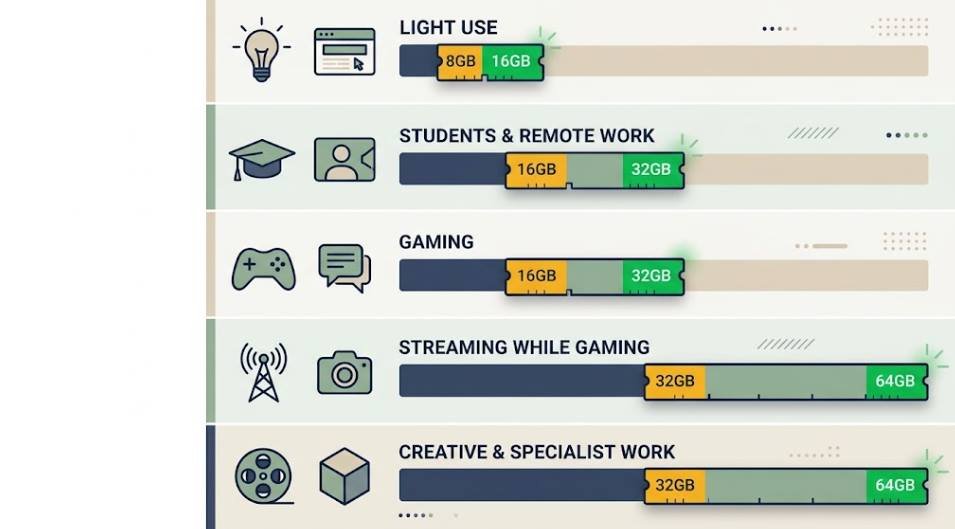
For most people, 16GB is the sweet spot and 32GB is the comfortable choice for gaming and heavy multitasking. Newegg’s 2026 memory guide reaches the same conclusion, calling 16GB the practical minimum for comfortable computing. Here is the short version:
| Use case | Minimum | Recommended | Why |
|---|---|---|---|
| Light use (browsing, email, streaming) | 8GB | 16GB | Modern browsers and Windows 11 use memory quickly |
| Students and remote work | 16GB | 16GB | Office apps, video calls and many tabs at once |
| Gaming | 16GB | 32GB | Newer AAA games and background apps push 16GB hard |
| Streaming while gaming | 16GB | 32GB | OBS, Discord and a browser all compete for memory |
| Photo, video and design work | 16GB | 32GB | Large files and layered projects |
| 8K video, 3D rendering, VMs, local AI | 32GB | 64GB+ | Huge working sets stay in memory |
What Does RAM Do?
RAM (Random Access Memory) is your computer’s short-term workspace. Think of your SSD as a filing cabinet and RAM as the desk where you do your work: the bigger the desk, the more you can have open at once without constantly shuffling things back into the cabinet. As Intel explains, RAM loses its contents when the power goes off, which is why it is separate from storage. When RAM fills up, your PC falls back on the much slower drive, and that is when lag and stutter appear.
8GB vs 16GB vs 32GB vs 64GB: Which Capacity Do You Need?
Match your RAM to the most demanding thing you do regularly, not to an aspirational use case. The type of machine matters too, and our complete guide to types of computers explains how laptops, desktops and workstations differ in what they can hold.
Good fits
- 16GB: everyday computing, students, remote work and most gaming.
- 32GB: enthusiast gaming, streaming, 4K video editing, development work.
- 64GB: 8K video, 3D rendering, virtual machines and data science.
Poor fits
- 8GB: too little for most modern Windows PCs and any new gaming build. Fine only for light use or a Chromebook.
- 64GB for gaming only: it mostly sits empty.
One caution on 8GB: Magic Micro points out that Windows and background processes can eat 3 to 5GB at idle, leaving very little headroom for anything demanding.
How Much RAM Do You Need for Gaming?
16GB is the floor and 32GB is where most gamers should land. Micro Center’s breakdown says 8GB is no longer practical for gaming, 16GB is viable but becoming the new minimum, and 32GB is the sweet spot for high-performance gaming and streaming.
RAM rarely raises your average frame rate. What it protects is your 1% lows, the dips that feel like stutter. That is why 16GB and 32GB can show nearly identical average FPS in a benchmark, yet 32GB feels smoother once you add Discord, a browser and a music app.
Quick rule: if you only launch a game and close everything else, 16GB works. If you stream, keep a browser open, run mods or want a PC that lasts four or five years, go for 32GB.
DDR4 vs DDR5: Which Should You Buy for Gaming?
For a new build, DDR5 is the right call, mainly because current platforms such as AMD AM5 require it. The performance gap is smaller than the marketing suggests: Tom’s Hardware testing found DDR5 gave only 1 to 3% higher average FPS than well-tuned DDR4 in most games. Where DDR5 helps more is in smoothness during fast asset streaming in open-world titles.
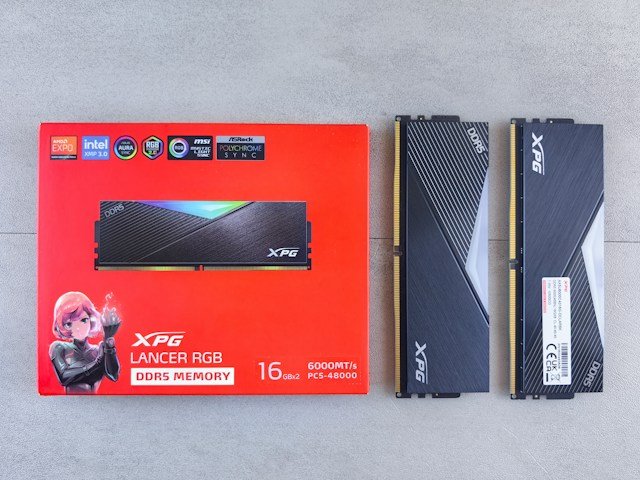
Your motherboard decides the type, so you cannot mix them. If you are staying on an older DDR4 platform, going from 16GB to 32GB of DDR4 will do more for you than switching generations. For speed, clock speed matters but is not the top factor, and DDR5-6000 is widely treated as the sweet spot between speed and latency. Remember to enable the XMP (Intel) or EXPO (AMD) profile in your BIOS, otherwise your kit may run slower than advertised.
Single vs Dual Channel RAM: Why It Matters
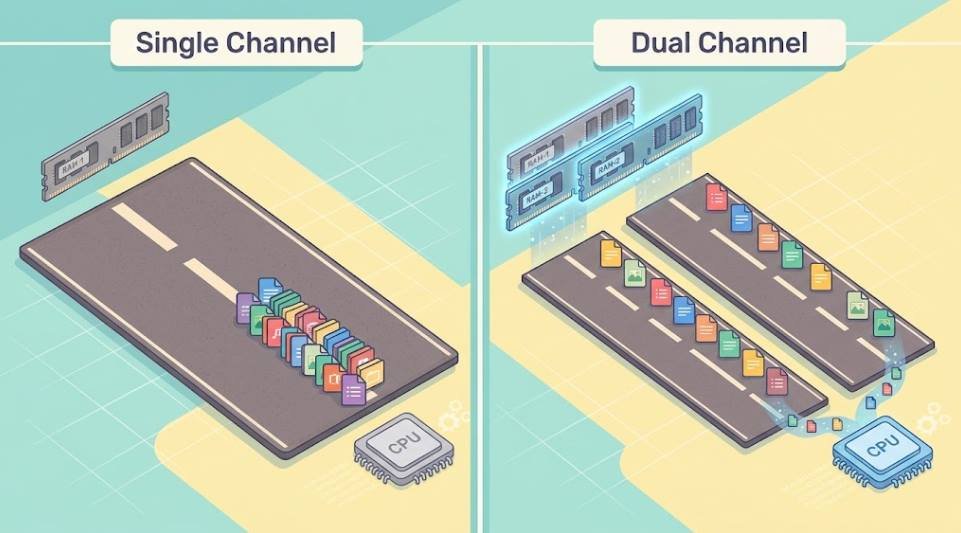
Running a single stick is a mistake that often costs more performance than choosing the wrong capacity. Two matched sticks in dual-channel mode give your CPU roughly double the memory bandwidth of a single stick, so two 16GB modules will outperform one 32GB module even though Windows shows 32GB either way. The general consensus, also noted in a CG Director comparison, is that dual channel performs better in many use cases.
- Buy a matched kit (2x16GB rather than 1x32GB).
- Install the sticks in the slots your motherboard manual recommends, usually slots 2 and 4.
- When upgrading, replace the whole kit if you can, or match brand, model and speed.
Is 64GB, 96GB or 128GB of RAM Overkill?
For gaming and everyday use, yes, almost always. CLX Gaming notes that unused RAM is wasted, and that the money is better spent on a faster GPU or SSD. Newegg goes further and calls 64GB massive overkill for the overwhelming majority of users.
These sizes make sense in specific cases:
| Capacity | Worth it if you… | Overkill if you… |
|---|---|---|
| 64GB | Edit 8K video, render 3D scenes, run several VMs, or stream seriously while gaming at high settings | Only game and browse |
| 96GB | Work with very large projects or datasets and have hit the limits of 64GB | Have not measured a real shortage |
| 128GB | Run workstation-class workloads, heavy virtualization or large local AI models | Are building a gaming or office PC |
The honest test: open Task Manager during your heaviest normal work. If memory usage stays well below your total, more RAM will not make anything faster. Micro Center does list future-proofing as a valid reason for 64GB, but with current prices that is an expensive way to do it.
How Much RAM Do You Need for a Gaming Laptop?
The same rules apply, with one big exception: upgradability. Aim for 16GB as the minimum and 32GB if you also stream, create content or want the laptop to last. Newegg says 2026 AAA titles often list 16GB as the minimum and 32GB as recommended, and that content creators who game should choose 32GB.
Look for
- Dual-channel setup: two modules perform better than one.
- Open RAM slots: lets you start at 16GB and upgrade later.
- DDR5: standard in most new laptops.
Watch out for
- Soldered memory: you are locked in, so buy enough on day one.
- Confusing RAM with VRAM: the GPU’s video memory is separate from system RAM.
High-end gaming laptops are available with 64GB, as Micro Center notes, but that tier is for creators and developers rather than players.
How Much RAM Do You Need on a Phone?
Phones follow different rules because mobile operating systems manage memory aggressively. As a general guide, 8GB is comfortable for most people, 6GB works for basic use, and 12GB or more suits heavy mobile gamers and people who keep many apps open. Past that, a better chip, more storage or a stronger battery usually improves your day more than extra RAM. Phone memory also cannot be upgraded, so choose based on how long you plan to keep the device.
How Much RAM Do Popular Games Actually Use?
Real usage varies with settings, resolution, mods and what else is open, so treat these as ranges rather than exact numbers. The pattern below comes from retailer and builder guides such as Magic Micro and Micro Center.
| Game type | Examples | What to expect | Suggested RAM |
|---|---|---|---|
| Esports and competitive | Fortnite, Valorant | Light, but they benefit from extra headroom | 16GB |
| Modern AAA | Cyberpunk 2077, Baldur’s Gate 3, Monster Hunter Wilds | Some titles reach roughly 12 to 14GB on their own | 16GB minimum, 32GB ideal |
| Large simulations | Microsoft Flight Simulator, Cities: Skylines II | Heavy, especially with custom assets and mods | 32GB, 64GB for heavy mods |
| Game plus streaming | Any game with OBS, Discord and a browser | Total system usage climbs fast | 32GB |
Measure your own usage: press Ctrl + Shift + Esc, open the Performance tab, click Memory, then play for 30 minutes. If usage regularly sits above about 80% of your total, an upgrade will help.
How Much Does RAM Cost?
This is where 2026 looks very different from previous years. A global DRAM shortage, driven largely by AI data-center demand, has pushed retail prices up sharply. Tom’s Hardware’s price tracker reports that a 32GB (2x16GB) DDR5 kit that sold for around $100 to $200 in October 2025 now starts at about $350, if it is in stock. Newegg’s own buying guide says mainstream 32GB DDR5-6000 kits cluster around $399 to $479.
| Kit | Late 2025 | Around October 2026 |
|---|---|---|
| 32GB (2x16GB) DDR5 | About $100 to $200 | About $350 to $480, depending on speed and brand |
| 32GB (2x16GB) DDR4 | About $60 to $90 | Higher than in late 2025, as DDR4 prices also rose sharply earlier in 2026 |
Analysts quoted by BornCity expect contract prices to keep rising in the fourth quarter of 2026, and other market reports point to meaningful relief only in 2027. Prices change quickly and vary by region, so check live listings such as Micro Center’s memory page before you buy.
Money-saving tip: if a 32GB kit is out of budget, a quality 16GB kit now is a reasonable choice for gaming. If you buy a desktop with free slots, you can add a second matching kit later rather than overpaying for capacity you do not use yet.
Can You Upgrade Your RAM?
It depends on the device. Most desktops have standard slots, so adding or swapping RAM is easy, and a step-by-step PCWorld guide shows the process. Laptops are mixed: some gaming laptops and workstations have upgradeable slots, but many thin-and-light models use soldered memory that cannot be changed. Phones and most Macs are also fixed.
Upgradeable
- Most desktop PCs
- Many gaming laptops and mobile workstations
- Some business laptops with SODIMM slots
Soldered (fixed memory)
- Most ultra-thin laptops and 2-in-1s
- Most Macs
- All phones and tablets
Before buying anything, look up your exact model in the maintenance guide on the HP Support site or your manufacturer’s equivalent. If memory is soldered, buy the capacity you will need three years from now, not just today.
Frequently Asked Questions
Do I need 16GB or 32GB of RAM?
Choose 16GB for everyday use and casual gaming. Choose 32GB if you play demanding games, stream, edit video or want the PC to stay comfortable for four or five years.
Is 32GB of RAM overkill?
For gaming and heavy multitasking, no. It gives smoother performance and future-proofing, though many games still run fine on 16GB. For simple web and office use, 32GB is more than you need.
Is 32GB of RAM enough in 2026?
Yes. It handles current games, streaming and most creative work comfortably. Only specialist workloads such as 8K editing, large VMs or big local AI models push beyond it. HP recommends 32GB for enthusiast gaming, heavy creative work and local AI tasks.
How many GB of RAM is good?
16GB is good for most people in 2026, and 32GB is good for gamers and creators. 8GB is only acceptable for light use or Chromebooks.
What type of RAM should I get for gaming?
For a new PC, get a matched 2x16GB DDR5 kit, ideally around 6000 MT/s, and enable XMP or EXPO in the BIOS. Check that your motherboard supports DDR5 first.
Does more RAM increase FPS?
Rarely. Extra RAM mostly reduces stutter and improves 1% lows once you would otherwise run out of memory. It will not lift average frame rates the way a better GPU does.
How do I check how much RAM I have?
On Windows 10 or 11, go to Settings > System > About and look for “Installed RAM.” For live usage, press Ctrl + Shift + Esc, open Task Manager and select the Performance tab, then Memory.
Final Thoughts
Buy for the work you actually do. 16GB covers most people, 32GB is the best all-round choice for gamers and creators, and 64GB or more is a specialist purchase. Always choose matched DDR5 sticks in dual channel for a new build, and think carefully before buying a laptop with soldered memory. With prices still elevated, measure your real usage in Task Manager first, then spend only on the capacity you will use. If you want more background, read our guides on how computers work and the different types of computers.