
Picking a laptop screen size sounds simple until you see 13, 14, 15.6, and 16-inch models that all look close on paper. This guide compares each size by real dimensions, weight, battery life, and resolution so you can choose with confidence.
The short answer
Choose 14 inches if you want one size that suits most people. Go 13 inches for constant travel, and 16 inches if the laptop screen is your main workspace.
Who this guide is for
Students, remote workers, gamers, creators, and first-time buyers who want a clear answer without reading a spec sheet.
Screen size shapes almost everything else about a laptop: its weight, how well it fits in your bag, how much cooling it has room for, and how long the battery lasts. Brand guides such as ASUS’s display buyer’s guide and HP’s laptop screen size guide both treat it as one of the first choices to make. If you are still deciding between a laptop and a desktop, start with our laptop vs desktop guide, or browse all the types of computers first.

Quick Answer: Which Laptop Screen Size Should You Pick?
If you do not want to read the whole guide, use this table. Find the line that sounds most like you, and the size on that line is your starting point.
| If you… | Pick | Why |
|---|---|---|
| Carry your laptop every day | 13 to 14 inches | Light, compact, and easy to fit in any bag |
| Want one laptop for everything | 14 inches | Best balance of screen space and portability |
| Are on a tight budget | 15.6 inches | The widest choice of affordable models |
| Edit video, code, or game | 16 inches | More workspace and more room for cooling |
| Rarely move your laptop | 16 to 17 inches | Works like a desktop replacement |
| Plug into an external monitor at your desk | 13 to 14 inches | You get the big screen at your desk and a light laptop everywhere else |
Standard Laptop Screen Sizes: Chart in Inches and cm
Most shops round the size in the product name, so a “13-inch” laptop is usually 13.3 inches and a “15-inch” laptop is usually 15.6 inches. The chart below shows the real diagonal and the typical screen width and height for each common size.
| Common label | Real diagonal | Diagonal (cm) | Screen width × height (inches) | Screen width × height (cm) | Typical aspect ratio |
|---|---|---|---|---|---|
| 13-inch | 13.3″ | 33.8 cm | 11.3 × 7.0 | 28.7 × 17.9 | 16:10 or 16:9 |
| 14-inch | 14″ | 35.6 cm | 11.9 × 7.4 | 30.2 × 18.8 | 16:10 |
| 15-inch | 15.6″ | 39.6 cm | 13.6 × 7.7 | 34.5 × 19.4 | 16:9 |
| 16-inch | 16″ | 40.6 cm | 13.6 × 8.5 | 34.5 × 21.5 | 16:10 |
| 17-inch | 17.3″ | 43.9 cm | 15.1 × 8.5 | 38.3 × 21.5 | 16:9 |
Good to know: These numbers measure the visible screen only, not the whole laptop. The body is always bigger because of the bezels and hinge, so check the laptop’s own width and depth if bag space matters. Values are rounded and calculated from the common aspect ratios.
How Laptop Screen Size Is Measured (And What 15.6 Inches Really Means)
Laptop screen size is the diagonal of the visible display, measured from one corner of the panel to the opposite corner. It is not the width, and it does not include the plastic frame around the screen. So 15.6 inches means a diagonal of about 39.6 cm, and the screen itself is roughly 13.6 inches wide (in the common 16:9 shape).
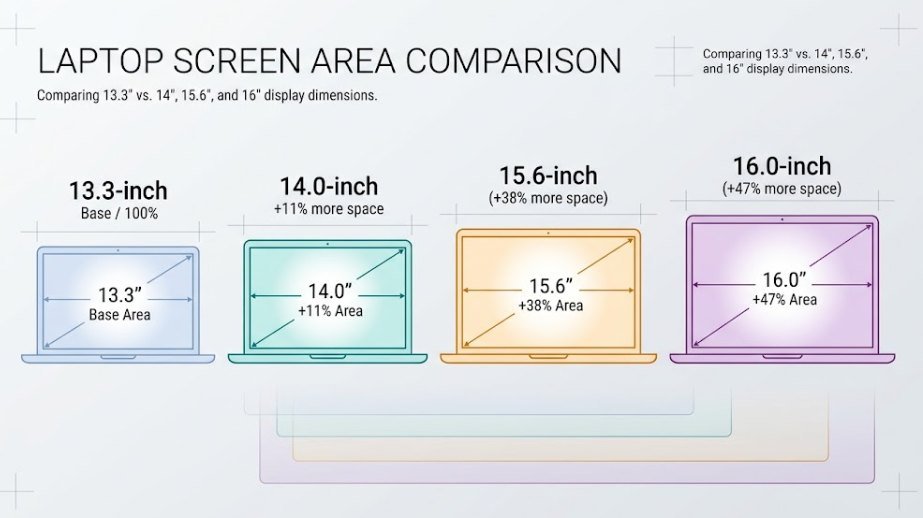
Two things make the diagonal number misleading. First, the same diagonal can have a different shape. A 16:10 screen is taller than a 16:9 screen, so it shows more of a document or web page. Second, area grows with the square of the diagonal. A 16-inch 16:10 panel has roughly 31% more display area than a 14-inch 16:10 panel, even though it is only two inches larger on the label. That is why 16 inches feels much roomier than 14.
13-Inch Laptops: Best for Portability
A 13-inch laptop is the lightest mainstream option, typically weighing about 1.0 to 1.4 kg (2.2 to 3.1 lb). It slides into almost any bag, fits on a small café table, and usually delivers the longest battery life of the group.
Best for
- Students moving between classes
- Frequent travelers and commuters
- Writing, email, browsing, and video calls
- People who dock to a monitor at a desk
Trade-offs
- Two windows side by side feel tight
- Large spreadsheets need constant scrolling
- Fewer ports on many thin models, so check the ports before you buy
14-Inch Laptops: The Sweet Spot (Is 14 Inches Too Small?)
No, 14 inches is not too small for most people. Modern 14-inch laptops use thin bezels, so the body is often about the same size as an older 13-inch laptop while the screen is noticeably larger. Typical weight is 1.2 to 1.6 kg (2.6 to 3.5 lb), and the screen is big enough to run a browser and a document side by side.
This is why many buying guides, including the one from HP, suggest 14 inches as the default when you are unsure. It suits students, office workers, freelancers, and anyone who works at a desk most days but still travels with the laptop.
When 14 inches is too small: If you spend whole days in huge spreadsheets, edit long video timelines on the laptop itself, or never carry it anywhere, you will probably be happier with 16 inches.
15-Inch Laptops: How Big Is a 15.6-Inch Screen?
A 15.6-inch screen has a diagonal of 39.6 cm and measures about 13.6 × 7.7 inches (34.5 × 19.4 cm) in the usual 16:9 shape. Complete laptops in this class are typically 1.5 to 2.0 kg (3.3 to 4.4 lb), and most are wide enough to include a full number pad on the keyboard.
For years this was the default laptop size, and it is still where much of the budget and mid-range choice sits. That makes it a good pick if price matters most. The drawback is shape: a 16:9 screen is shorter than a 16:10 screen of the same diagonal, so a 15.6-inch laptop can show less of a page than you might expect. If you want a number pad and a bigger display, many buyers now choose 16 inches instead, because it is often a similar size on the desk.
16-Inch Laptops: Best for Power Users and Creators
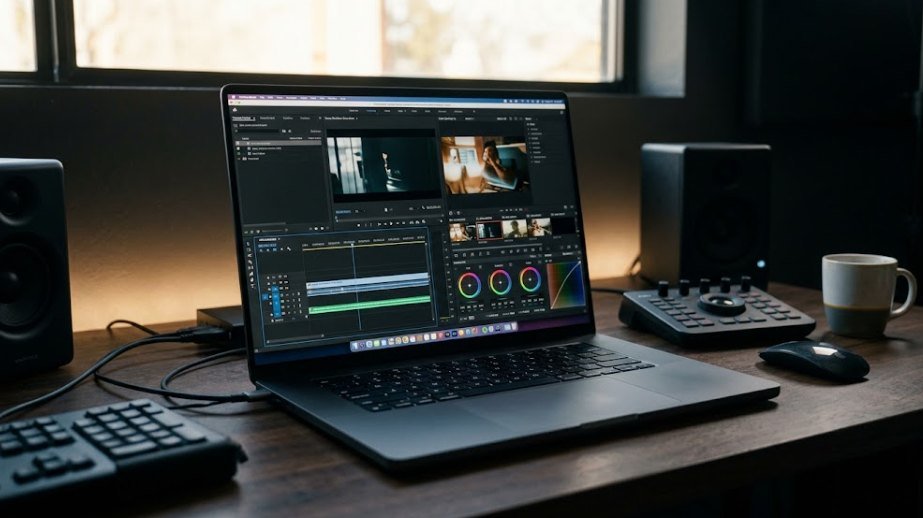
A 16-inch laptop gives you the most useful screen area before you reach desktop-replacement territory. Thin bezels and a taller 16:10 shape let makers fit it into a body close to older 15.6-inch laptops. Weight usually falls between 1.6 and 2.4 kg (3.5 to 5.3 lb).
The extra body also leaves space for bigger fans, which helps powerful processors and graphics chips stay fast under load. That is why gaming and creator laptops cluster at this size. If you plan to run demanding apps, read CPU vs GPU to see which part matters most, and our guide on how much RAM you need before picking a configuration.
Best for
- Creators: video editing, photography, design
- Developers: code, terminal, and docs on one screen
- Gamers: bigger display and better cooling
- Home workers: fewer reasons to buy a second monitor
Trade-offs
- Weight: noticeable in a bag every day
- Space: needs a deeper desk and a roomier backpack
- Battery: powerful models drain faster
17-Inch Laptops: Is 17 Inches Too Big?
A 17-inch laptop is too big for daily carrying, but it is the right size for a laptop that lives on a desk. Expect a weight of about 2.2 to 3.0 kg (4.9 to 6.6 lb), a wide body, and a large power adapter. Battery life is also shorter, especially when gaming.
This size makes sense for gamers, engineers, and anyone who wants one powerful machine that only moves between rooms. If you rarely travel with it, a 17-inch laptop can work as a desktop replacement. Even so, keep the screen about an arm’s length away, which is a common starting point in monitor positioning guidance from CCOHS, and use an external keyboard if you type for hours.
13 vs 14 vs 15 vs 16 Inch: Side-by-Side Comparison Table
Here is how the four main sizes compare at a glance. Weights and battery life vary by model, so treat these as typical ranges rather than guarantees.
| Feature | 13-inch | 14-inch | 15.6-inch | 16-inch |
|---|---|---|---|---|
| Typical weight | 1.0–1.4 kg (2.2–3.1 lb) | 1.2–1.6 kg (2.6–3.5 lb) | 1.5–2.0 kg (3.3–4.4 lb) | 1.6–2.4 kg (3.5–5.3 lb) |
| Battery potential | Longest | Very good | Good | Good, but power-hungry models drain faster |
| Screen workspace | Limited | Good | Good (16:9 is shorter) | Very good |
| Price tendency | Small premium for thin designs | Wide range, popular mid-range pick | Widest range, many budget models | Mid to premium, gaming and creator models cost more |
| Best for | Travel and students | Most people | Budget buyers and number-pad users | Creators, gamers, and desk-based work |
13 vs 14 Inch, 14 vs 15 Inch, and 14 vs 16 Inch: Head-to-Head
13 vs 14 inch
The body size and weight difference is small, often only a few centimeters and a couple of hundred grams, while the screen and keyboard gain is easy to notice. Choose 13 inches only if every gram matters or you mainly use a docked monitor. Otherwise 14 inches is the safer buy.
14 vs 15 inch
A 15.6-inch laptop is wider and heavier, and it often costs less. A 14-inch laptop is easier to carry and, with a 16:10 screen, can show almost as much content. Pick 15.6 inches for budget and a number pad. Pick 14 inches for portability.
14 vs 16 inch
This is the choice that matters most. A 16-inch screen has about 31% more area, which makes split-screen work and editing far more comfortable. A 14-inch laptop wins on weight and bag space. If you carry it most days or use a monitor at your desk, choose 14 inches. If the built-in screen is your main display, choose 16 inches.
Screen Size, Resolution, and Aspect Ratio Explained Simply
Resolution is the number of tiny dots (pixels) on the screen. A bigger screen with the same resolution has larger dots, so text looks softer. The measure that tells you how sharp a screen looks is pixel density, written as pixels per inch (PPI). For a refresher on how pixels and graphics fit into the bigger picture, see how computers work.
| Screen size | Solid minimum | Approx. sharpness | Sharper option | Approx. sharpness |
|---|---|---|---|---|
| 13.3″ | 1920 × 1200 | 170 PPI | 2560 × 1600 | 227 PPI |
| 14″ | 1920 × 1200 | 162 PPI | 2560 × 1600 | 216 PPI |
| 15.6″ | 1920 × 1080 | 141 PPI | 2560 × 1440 | 188 PPI |
| 16″ | 1920 × 1200 | 142 PPI | 2560 × 1600 | 189 PPI |
| 17.3″ | 1920 × 1080 | 127 PPI | 2560 × 1440 | 170 PPI |
As a rough guide, about 140 to 170 PPI is fine for everyday work, and 180 to 220 PPI is noticeably sharper, which ASUS also notes in its display guide. That is why Full HD looks crisp on a 14-inch screen but can look soft on a 17-inch one. Higher resolutions also ask more of the graphics chip and the battery, which is another reason to read about CPU vs GPU before paying extra for a 4K panel.
16:10 vs 16:9: Which Aspect Ratio Is Better?
Aspect ratio is the shape of the screen. A 16:9 screen is wide and suits movies and many games. A 16:10 screen is slightly taller, which suits documents, web pages, spreadsheets, and code. With the same width, 1920 × 1200 gives you about 11% more vertical pixels than 1920 × 1080. For general use, 16:10 is the better shape when you have the choice.

Avoid: Very low resolution panels such as 1366 × 768, which make text look fuzzy at any size. Also be careful about paying for 4K on a 13 or 14-inch screen, where the extra sharpness is hard to see and drains the battery faster.
Laptop Screen Size vs Weight and Battery Life
A bigger screen usually means a bigger body, more weight, and more power use. Size is only part of the battery story, though. Brightness, resolution, refresh rate, battery capacity, the processor, and what you are doing all matter, so compare tested battery results for the exact model rather than judging by screen size alone. If a laptop you already own drains quickly, our guide to common computer problems can help you troubleshoot it.
Smaller screens (13 to 14 inches)
- Weight: easy to carry all day
- Battery: smaller panels tend to use less power
- Space: fits small desks and tray tables
Larger screens (16 to 17 inches)
- Weight: heavier, with a bigger charger
- Battery: shorter under heavy use such as gaming
- Space: needs a deeper desk and a larger bag
Laptop Screen Size FAQs
Is it better to have a 13 or 15 inch laptop?
Choose 13 inches if you travel often and want the lightest laptop. Choose 15.6 inches if you work mostly at a desk, want a bigger screen, or need a number pad and a lower price. If you cannot decide, 14 inches sits in the middle.
Should I get a 14 or 15 inch laptop?
Get 14 inches for portability and a balanced size. Get 15.6 inches if budget matters most or you want a number pad. A 14-inch laptop with a 16:10 screen can show nearly as much content as a 15.6-inch model.
Do I want a 14 or 16 inch laptop?
Pick 14 inches if you carry your laptop daily or connect it to a monitor at your desk. Pick 16 inches if the built-in screen is your main workspace for editing, coding, spreadsheets, or gaming. The 16-inch screen has roughly 31% more area.
Should I get a 15 or 17 inch laptop?
Choose 15.6 inches if you move your laptop between places. Choose 17.3 inches only if it will mostly stay on a desk and you want the biggest built-in screen. A 17-inch laptop is heavier and has shorter battery life.
Do 18-inch laptops exist?
Yes, but they are rare. A few gaming and workstation models use 18-inch screens, and they are very large and heavy. For most buyers, 17.3 inches is the practical upper limit, and 16 inches is a better balance.
What is the most popular laptop screen size?
For many years the most common size has been 15.6 inches, thanks to its low prices and wide choice. Today 14 and 16 inches are growing fastest because thinner bezels give you more screen in a similar body.
Is a 14 inch laptop too small?
For most people, no. A 14-inch screen handles browsing, documents, video calls, and two windows side by side. It can feel small only if you use large spreadsheets or editing timelines all day without an external monitor.
Final Thoughts
The best laptop screen size is the smallest one that comfortably handles your daily work. For most people that means 14 inches. Move down to 13 inches if portability comes first, step up to 15.6 inches if budget comes first, and choose 16 inches if you need a bigger workspace or more power. Once you have settled on a size, the next question is memory, so read our guide on how much RAM you need to finish your shortlist.